
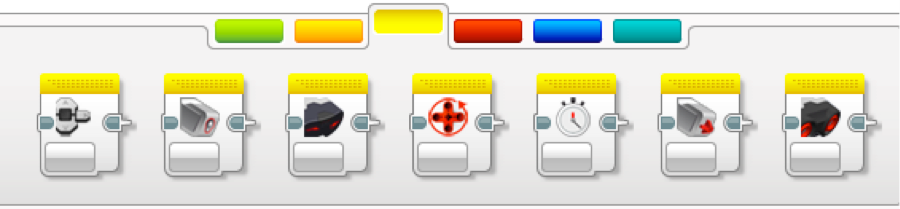
| Blocks | Description | Inputs | Outputs |
 |
Block measures or compares the output of a variable when a button is pressed. For more information, go to this link: Brick Buttons. |
Set of Brick Button IDs [2]: Nothing (0), Left (1), Center (2), Right (3), Up (4), Down (5). State: Released (0), Pressed (1), Bumped (3). |
Button ID: Nothing (0), Left (1), Center (2), Right (3), Up (4), Down (5). Compare Results: Boolean. |
 |
Color Sensor: Talk to a teacher or mentor about this block because there is more information.
*The ‘Wire’ input option allows you to use the output of another block as your input value.
For more information, go to this link: Color Sensor.
|
Port: 1, 2, 3, 4, Wired. |
N/A |
 |
Infrared Sensor: Do not use, we do not have the accessory for this block. *The ‘Wire’ input option allows you to use the output of another block as your input value. |
Port: 1, 2, 3, 4, Wired. |
N/A |
 |
Motor Rotation: Will not use with NXT brick. |
Port: A, B, C, D. | N/A |
 |
Timer:
Block measures, compares, or resets a timer in the program.
For more information, go to this link: Timer.
|
Timer ID: 1: 1 – 8. Compare Type: Equal To (0), Not Equal To (1), Greater Than (2), Greater Than or Equal To (3), Lesser Than (4), Lesser Than or Equal To (5). Threshold Value: Any number. |
Elapsed Time: Any variable. Compare Result: Boolean. |
 |
Touch Sensor: Block must be used with touch sensor. This makes the brick react if the touch sensor is hit. *The ‘Wire’ input options allows you to use the output of another block as your input value. For more information, go to this link: Touch Sensor. |
Port: 1, 2, 3, 4, Wired. State: Released (0), Pressed (1), Bumped (3). |
State: Boolean. Compare Result: Logic. Measured Value: Released (0), Pressed (1), Bumped (2). |
 |
Ultrasonic Sensor: Block must be used with an ultrasonic sensor. This makes the brick aware of distances and what is around it. *The ‘Wire’ input options allows you to use the output of another block as your input value. For more information, go to this link: Ultrasonic Sensor. |
Measuring Mode: Ping (0), Continuous (1). Compare Type: Equal To (0), Not Equal To (1), Greater Than (2), Greater Than or Equal To (3), Lesser Than (4), Lesser Than or Equal To (5). Threshold Value: Any number. |
Distance in Inches: Any variable. Distance in Centimeters: Any variable. Ultrasound Detected: Boolean. Compare Result: Boolean. |